
Podcast Analytics
Understanding your podcast's performance is essential for growing your show. Analytics help you understand how many people are downloading your episodes, where most listeners are located, which episodes resonate the most etc.
For podcasters working with sponsors or advertisers, analytics become even more important - they're how you prove your show's value and justify ad rates.
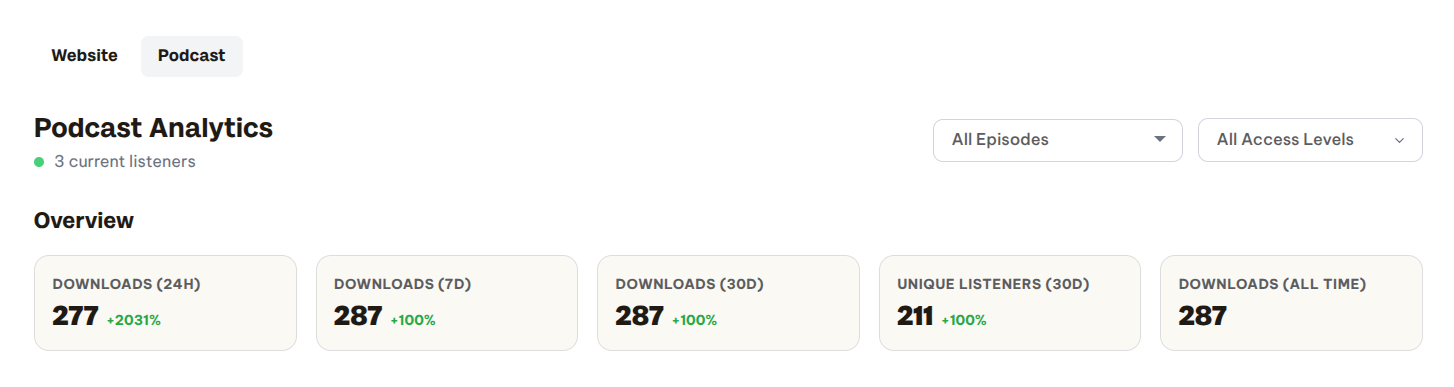
Built-in Podcast Analytics on Beamly
Beamly comes with a robust, native podcast analytics panel. You can track key data like:
- Downloads across selected date ranges
- Unique listeners and current listeners
- Real-time listening activity
- Episode trends and performance over time (first 7/30/90 days since the episode's initial release)
- Top-performing podcasts and episodes
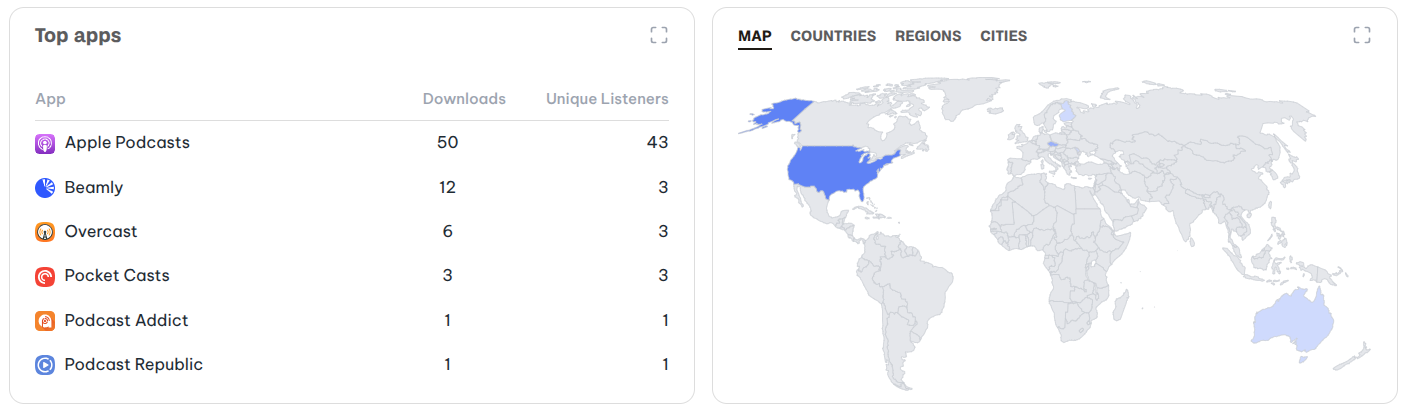
- Listening apps and platform distribution
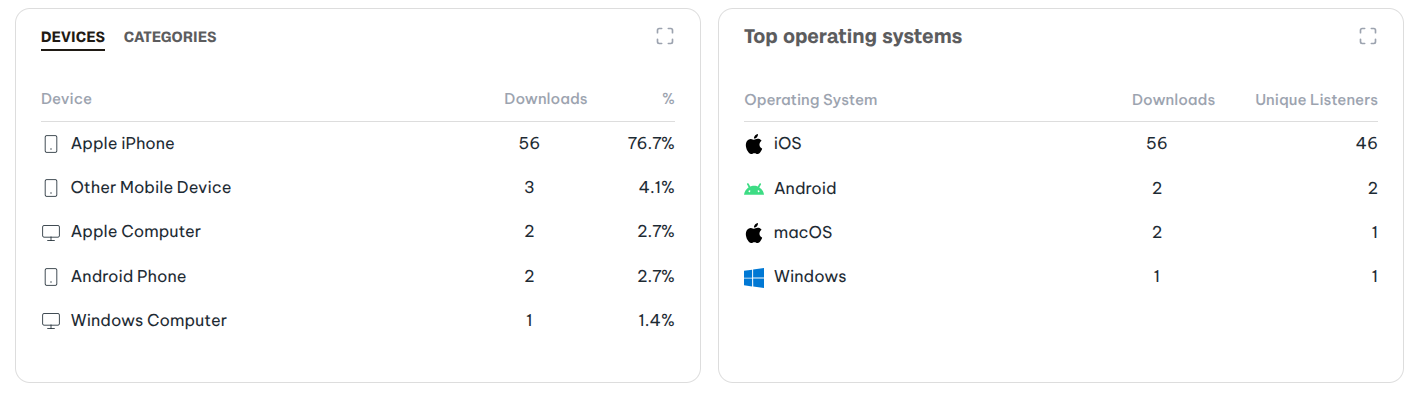
- Device and operating system usage
- Geographic breakdowns by location
You can filter all the data by podcast (in case you host a few shows on Beamly), by episode (to see all available data only for that specific episode), and access level (public episodes or private episodes).
Media played through your website would be tagged with the Beamly app icon.
If you upload video files as part of your podcast, those are included in the data as well.
Integrating with 3rd Party Analytics (prefixes)
You can easily enable 3rd party analytics via prefixes in your RSS feed.
Analytics prefixes help you track your podcast's performance across different advertising and measurement platforms. When enabled, these prefixes are automatically added to your episode download URLs in your RSS feed, allowing third-party services to measure downloads, track attribution, and provide detailed analytics.
Note: Podcast analytics features are only available for hosted podcasts (shows created directly on Beamly). Imported (synced) podcasts can manage their analytics through their original hosting provider.
Supported Prefix Providers
Beamly supports the following analytics prefix providers:
OP3 (Open Podcast Prefix Project)
OP3 is a free, open-source analytics service focused on transparency and listener privacy. It provides publicly verifiable download statistics without compromising listener data. Great for podcasters who want open, trustworthy metrics.
Podtrac
Podtrac is one of the most established podcast measurement services. Their prefix provides industry-standard download tracking and is widely recognized by advertisers and media buyers.
Podscribe
Podscribe provides attribution and conversion tracking for podcast advertisers. By enabling the prefix, advertisers can see real-time download data and measure performance beyond just promo codes - giving your show more credit for the conversions it drives.
Spotify Ad Analytics (Podsights)
Spotify Ad Analytics offers detailed campaign measurement for podcast advertising. This prefix enables compatibility with Spotify's attribution tools, helping you and your advertisers track the impact of podcast campaigns.
Learn more about Spotify Ad Analytics
Podcorn
Podcorn is a podcast advertising marketplace. Their analytics prefix allows you to accurately track your show's performance and optimize revenue through their advertising platform.
How to Enable Analytics Prefixes
- Go to Podcasts in your dashboard
- Click the Edit Podcast icon on your hosted podcast
- Scroll to the Analytics Prefixes section
- Enable the providers you want to enable - it's just a simple checkbox for each one!
- Click Save
Your RSS feed will automatically update to include the selected prefixes on all episode download URLs.
Note - You can enable multiple analytics prefixes simultaneously.
Some analytics providers require you to set up an account on their platform to access your data. The prefix enables the tracking, but you'll need to visit each provider's dashboard to view your analytics.